3D Product Configurators: The Complete Guide for Brands in 2026.
Overview
3D Product Configurators: The Complete Guide for Brands in 2026
WebGL · Unreal Engine 5 · Three.js · Shopify · AR Integration
Everything Brands Need to Know About 3D Product Configurators
From types and technology through to implementation, ROI, and mistakes to avoid — Elipse Studio's definitive guide for 2026.
What are 3D product configurators and why do brands invest in them?
A 3D product configurator is an interactive web tool that lets buyers customize a product — color, material, size, components — while a real-time 3D model updates to reflect each choice instantly. Brands invest in them because they consistently deliver measurable commercial outcomes: higher conversion rates (30–94% improvement), larger average order values (+20–40%), lower return rates (−25–40%), and higher-quality leads with complete product specifications attached. Elipse Studio builds custom 3D product configurators for brands worldwide, integrating WebGL and Unreal Engine 5 rendering with Shopify, WooCommerce, Magento, and enterprise commerce platforms since 2014.
If you are evaluating whether 3D product configurators are the right investment for your brand, you are asking a question that dozens of brands ask Elipse Studio every quarter. The answer is almost always the same: it depends on your product, your buyers, and your current conversion bottleneck — but for a well-defined subset of brands and product categories, a 3D product configurator is one of the highest-ROI digital investments available.
This guide covers everything you need to make that determination and, if the answer is yes, to implement it correctly. We have written it to be useful at every stage — whether you are learning what 3D product configurators are, comparing types, your product, understanding the technology involved, or trying to avoid the implementation mistakes that kill the ROI of otherwise well-conceived projects.
What Is a 3D Product Configurator?
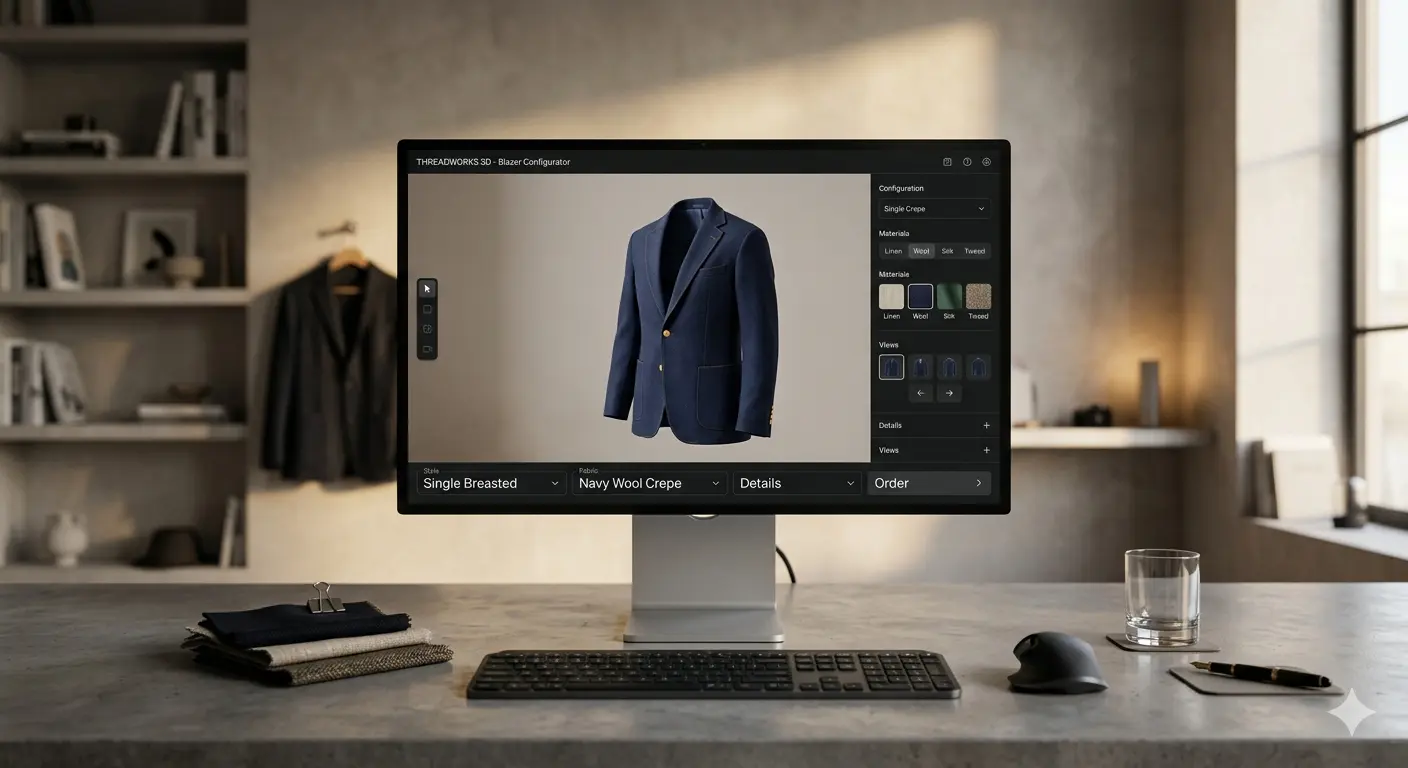
3D product configurators are interactive web applications that let customers customize products before purchasing, with every selection they make reflected immediately in a real-time three-dimensional visual preview. The buyer sees the product — not a photograph of a similar product, not a text description of a variant, but an accurate 3D rendering of the exact item they have configured — updating live as they choose options.
This is the critical distinction from older product customization approaches. A color-swap tool that changes a product photograph when you select a different color is not a 3D product configurator — it is a photo gallery with selection logic. A true 3D configurator renders the product geometry, applies physically based materials (PBR) that respond to lighting the same way real materials do, and allows the buyer to rotate, zoom, and inspect the product from any angle they choose. The difference in buyer experience — and commercial outcome — between the two approaches is substantial and measurable.
"The visual certainty that a well-built 3D product configurator creates is not a feature — it is the removal of the primary barrier between wanting a product and committing to it."
Elipse Studio — 3D Configurator Practice5 Types of 3D Product Configurators Explained
3D product configurators come in five distinct types, each built for different commercial purposes. Understanding the five main types helps brands identify which fits their product, their buyers, and their commercial objectives.
Visual Configurators — Appearance Customization
Focused on color, material, texture, and finish variation. The product geometry stays consistent; what changes is how it looks. Furniture colors, shoe colorways, vehicle paint, apparel patterns — all visual configurator territory. These are the most common 3D product configurators in B2C ecommerce and deliver strong ROI in any category where material appearance drives purchase decisions.
Structural Configurators — Geometry and Component Selection
Allow buyers to change dimensions, add or remove components, or select modules that alter the product's physical form. A sofa that can be extended from two to four seats, a shelving unit with adjustable dimensions, a bicycle where frame geometry changes with size selection — these require structural 3D configurators that update the underlying mesh, not just the material surface. More complex to build but essential for products where size and component variation is commercially significant.
CPQ Configurators — Configure-Price-Quote for B2B
Configure-Price-Quote systems combine 3D product configurator capabilities with real-time pricing logic and quote generation. As a B2B buyer selects product specifications, the system calculates pricing based on current costs, minimum quantities, and option combinations, then generates a formal quote document. Used extensively in industrial manufacturing, enterprise technology, and complex B2B product categories where price varies significantly with configuration.
AR-Extended Configurators — From Screen to Real Space
Combine a 3D product configurator with augmented reality output — buyers complete their configuration in 3D, then place their configured product in their physical environment via smartphone camera using WebAR or native AR. This extension is particularly valuable for furniture, home décor, and large products where spatial fit is a meaningful purchase concern. Elipse Studio builds WebAR extensions using 8th Wall and WebXR for frictionless no-app deployment.
Sales-Assisted Configurators — Tools for Sales Teams
Designed for use by sales representatives rather than end consumers. These give sales teams access to complete option trees, dealer pricing, and configuration tools that produce accurate quotes and share specifications with buyers during consultative sales conversations. Often the same underlying 3D configurator platform as the consumer-facing tool, with an expanded interface and data access layer for authenticated sales users.
Why Brands Are Investing in 3D Configurators in 2026
The commercial case for investing in 3D product configurators is built on documented outcomes that brands across product categories have generated from live deployments. These are not projections — they are the measured results of brands that made the investment and tracked the commercial impact.
Three commercial dynamics explain these outcomes consistently across deployments. First, 3D product configurators eliminate the visual uncertainty that causes abandonment — buyers who cannot see what they are buying hesitate and leave. Second, upgrades presented visually convert at higher rates than upgrades presented as text options with price differences — buyers who see the premium material rendered can judge its value; buyers who read "premium leather +" cannot. Third, a buyer who has invested time configuring their specific product is psychologically less likely to abandon the session — the endowment effect that ownership psychology produces before any transaction has occurred.
Ready to explore a 3D configurator for your product?
Elipse Studio scopes every project individually — start with your product catalog and objectives.
Technology: What Powers a Real-Time 3D Product Configurator
Understanding the technology behind 3D product configurators helps brand leaders evaluate vendor claims at a conceptual level helps evaluate vendor claims, assess timeline estimates, and make informed decisions about which approach fits the product's requirements.
WebGL — Three.js & Babylon.js
Browser-native 3D rendering via WebGL APIs. Three.js and Babylon.js provide the scene management, lighting, and material systems. Best choice for fast loading, broad device compatibility, and straightforward product visualization where photorealism is not the primary requirement.
Unreal Engine 5 / Pixel Streaming
Cinematic photorealism rendered server-side and streamed to the browser. Enables film-quality material rendering, global illumination, and Lumen lighting that WebGL cannot match. Ideal for luxury goods, automotive, and premium products where visual fidelity is the commercial differentiator.
Physically Based Rendering (PBR)
PBR materials simulate how light physically interacts with surfaces — metallic paint, fabric weave, leather grain, matte powder coat — responding to lighting conditions accurately. This material fidelity is what creates buyer confidence in color and finish selections. Elipse Studio builds PBR libraries from client production specifications.
Compatibility Rules Engine
The rules engine enforces which combinations of options are valid. Prevents buyers from selecting incompatible option sets — finishes that don't exist with certain base models, wheel specs that require specific suspension packages. This invisible logic is what makes configured orders buildable without post-sale correction.
Commerce API Connectivity
Shopify Storefront API, WooCommerce REST API, Magento GraphQL, and custom endpoints connect the configurator to cart, checkout, and order management. Configuration data — selected options, SKUs, production codes — flows automatically without manual re-entry.
WebAR — 8th Wall & WebXR
Browser-based augmented reality that places the configured product in the buyer's physical environment via smartphone camera without app download. Extends the configuration experience from screen to space for products where spatial fit is a purchase consideration.
Choosing the Right Rendering Approach
| Criteria | WebGL (Three.js / Babylon.js) | Unreal Engine 5 |
|---|---|---|
| Visual fidelity | Good — suitable for most products | Cinematic — film-quality materials |
| Load time | Fast (assets load locally) | Streamed — depends on server latency |
| Mobile performance | Excellent — runs on device GPU | Good — streamed, device-agnostic |
| Offline capability | Yes — fully client-side | Requires server connection |
| Best products | Furniture, apparel, consumer goods | Automotive, luxury goods, premium |
| Elipse Studio recommendation | Most B2C and B2B configurators | Where visual premium is the USP |
Industries That Benefit Most from 3D Product Configurators
The commercial return from 3D product configurators is highest in product categories where these three conditions align: the product has meaningful visual variation, the purchase decision is high-value enough to justify configuration time, and visual certainty about the product's appearance is a meaningful driver of purchase confidence.
Furniture & Home Décor
Material, color, and size selection — with AR spatial placement as extension
Automotive
Paint, trim, wheels, interior — OEM and dealer channel configurators
Footwear & Apparel
Custom colorways, materials, monogramming, and sizing
Industrial & B2B
Complex specification selection with CPQ quote generation
Real Estate
Unit, floor, orientation, and finish selection for off-plan sales
Marine & Powersports
Hull colors, interior, engine specs, and accessory packages
Consumer Electronics
Spec tiers, colors, storage, and accessory bundle selection
Kitchen & Bath
Cabinet styles, finishes, hardware, and layout configuration
How to Implement a 3D Product Configurator — Step by Step
Define Commercial Objectives First
Start with what 3D product configurators need to achieve commercially for your specific brand — higher conversion on a specific product line, reduced return rate for a category with high post-delivery complaints, improved lead quality for a B2B sales team. These objectives determine every subsequent decision, from which features to prioritize to how success is measured post-launch.
Audit Your Product for Configuration Depth
Map every configurable attribute of your product — colors, materials, sizes, components, finishes, add-ons. Identify which combinations are valid, which are incompatible, and which are conditional. This audit becomes the specification for the rules engine and determines the complexity of the 3D asset production required.
Plan Your 3D Asset Production
The quality of the 3D assets determines the quality of the buyer experience. Assets produced from CAD files are more accurate than those modeled from photographs — and critical for 3D product configurators that must match the manufactured product. Elipse Studio builds every 3D asset for configurator use from client-provided technical data, ensuring the digital product matches the manufactured product precisely.
Choose Your Rendering Technology
WebGL (Three.js or Babylon.js) for fast loading and broad compatibility. Unreal Engine 5 for photorealistic rendering where visual premium is the commercial differentiator. The right choice depends on your product category, target device profile, and the visual fidelity level your buyers need to achieve purchase confidence. Elipse Studio recommends based on your specific product and audience.
Integrate With Commerce and CRM Systems
Plan commerce integration from the start, not as a retrofit. The 3D configurator must connect to Shopify, WooCommerce, Magento, or your custom commerce platform to pass accurate configuration data into orders. For B2B, CRM integration routes configured quote requests into HubSpot, Salesforce, or Pipedrive with complete specification attached. Elipse Studio treats these integrations as non-negotiable elements of every deployment.
Test on Real Devices Before Launch
A 3D configurator that performs beautifully on a development workstation and stutters on a mid-range smartphone loses buyers at exactly the moment their intent is forming. Test across iOS Safari, Android Chrome, and a range of device capabilities before launch. Performance on real user devices is the metric that matters for commercial outcomes, not benchmark performance on premium hardware.
Launch, Measure, Iterate
Instrument the configurator to track session depth, option selection frequency, drop-off points, and conversion at the end of the flow. This data identifies which configuration options are underutilized, where buyers abandon the flow, and which upgrades are converting — enabling continuous improvement of the experience based on actual buyer behavior rather than assumptions.
See Elipse Studio's configurator projects in action
From boat configurators to furniture builders — view the complete portfolio.
6 Mistakes That Kill 3D Product Configurator ROI
Building 3D product configurators well is half the battle — knowing what to avoid saves the investment from producing disappointing outcomes.
Mistake #1 — Building Without Commerce Integration
A 3D configurator that creates beautiful experiences but cannot pass configuration data to your commerce or CRM system is a demonstration tool, not a sales tool. Every configured session that ends without a checkout connection or CRM entry is a lost conversion. Integration must be planned from day one, not added after the experience is built.
Mistake #2 — Prioritizing Visual Quality Over Load Performance
Maximum visual fidelity at the cost of slow load times destroys the engagement benefit of the configurator. Buyers who wait 8 seconds for a 3D scene to load have already decided the experience is not worth their time. Asset optimization for real-world device performance must be a primary design constraint, not an afterthought.
Mistake #3 — No Compatibility Logic Engine
Allowing buyers to select incompatible option combinations creates two problems: order errors that cost money to correct, and buyer confusion when combinations they chose cannot actually be produced. A 3D product configurator without a rules engine is a liability for brands with complex option matrices.
Mistake #4 — Ignoring Mobile Performance
A significant proportion of product research — including for high-value purchases — happens on smartphones. A 3D configurator that is not tested and optimized for mobile loses buyers at first impression. iOS Safari and Android Chrome on mid-range hardware are the environments that determine commercial performance, not a desktop browser on a development machine.
Mistake #5 — Placing Lead/Purchase Capture Too Late in the Flow
Buyers reach peak purchase intent at the moment they complete their configuration. Brands that require additional steps — account creation, separate quote request forms, delayed follow-up emails — between configuration completion and commitment capture lose conversions at their highest point. The capture mechanism must be embedded in the configurator flow itself.
Mistake #6 — Building Inaccurate 3D Assets
A 3D product configurator that shows colors or materials inaccurately creates the exact problem it is supposed to solve — buyers receive a product that looks different from what they configured, driving returns and destroying trust. PBR materials must be matched to production specifications. Colors must be validated against physical samples. Dimensions must be accurate to within specification tolerance.
✅ Pre-Build Checklist — 12 Things to Have Ready Before Your 3D Product Configurators Launch
How Elipse Studio Builds 3D Product Configurators
Elipse Studio has delivered 3D product configurators for brands worldwide since 2014 — across furniture, automotive, marine, fashion, industrial, and consumer goods categories. Our approach combines deep 3D production expertise, real-time rendering engineering, and commerce integration depth in a single practice, which means clients receive a platform engineered for commercial outcomes from the first line of code.
Our technology selection follows the project requirements rather than a preferred stack. Three.js and Babylon.js for projects where load time and device compatibility are primary constraints. Unreal Engine 5 with Pixel Streaming for projects where photorealistic material rendering is the commercial differentiator. We use the same PBR material production pipeline regardless of rendering engine — materials are matched against client production specifications and validated against physical samples before any buyer sees them.
Every platform Elipse Studio delivers — across all types of 3D product configurators — includes a compatibility rules engine built from the client's actual product specification data, commerce platform integration that passes configuration data directly into order management without manual re-entry, and analytics instrumentation that gives our clients visibility into how buyers are using the configurator and where the conversion funnel loses momentum. AR extension via 8th Wall WebAR is available for products where spatial placement confidence matters commercially.
We scope every project individually. A focused single-product visual configurator for a furniture brand has a different scope than a multi-model structural configurator with CPQ functionality for an industrial manufacturer. Both projects benefit from the same underlying methodology: commercial objectives first, technical decisions in service of those objectives, integration depth as a non-negotiable requirement, and real-device performance as the benchmark for launch readiness.
Frequently Asked Questions
What is a 3D product configurator?
What types of 3D product configurators exist?
What technology is used to build 3D product configurators?
How long does it take to build a 3D product configurator?
Which industries use 3D product configurators most?
What makes a 3D configurator better than a standard image-swap tool?
Related Topics
The Complete Picture
A 3D product configurator is not the right investment for every brand. For products with minimal variation or low transaction values, 3D product configurators will not generate the returns documented elsewhere in this guide. But for brands where product variation is meaningful, average order values are substantial, and buyers currently hesitate because they cannot clearly see what they are committing to — a well-built 3D product configurator is among the most commercially efficient digital investments available.
The key word is well-built. The outcomes documented throughout this guide — 30-94% conversion lift, 40% AOV increase, 30% return rate reduction — come from well-built 3D product configurators — accurate assets, proper commerce integration, compatible rules engines, and real-device performance optimization. They do not come from template deployments with generic 3D models and disconnected lead capture.
Elipse Studio builds 3D product configurators engineered for these outcomes. If your product and commercial context fit the profile described in this guide, the conversation about your specific project starts with your product catalog, your current conversion bottleneck, and what measurable improvement you need to justify the investment.
Elipse Studio · 3D Product Configurators
Ready to Build a 3D Configurator That Moves Your Commercial Metrics?
Tell Elipse Studio about your product range, your buyers, and your commercial objectives. Our team responds within one business day with a scoped approach and realistic timeline for your project.
Related Articles & Services
Latest Work
Contact Us
Let’s build something remarkable.
Share your project details and we’ll craft an experience your audience will remember.
Or reach out directly for a quicker response